
Karaoke Mode for YouTube is a unique extension for Google Chrome able to remove vocals from music track. The extension is great for those who like to sing or learn to sing their favorite songs.
Our opinion
The Karaoke Mode for YouTube is an extension for Google Chrome that expands the possibilities for fun with YouTube videos. The application was developed to meet the need of those who are passionate about karaoke.
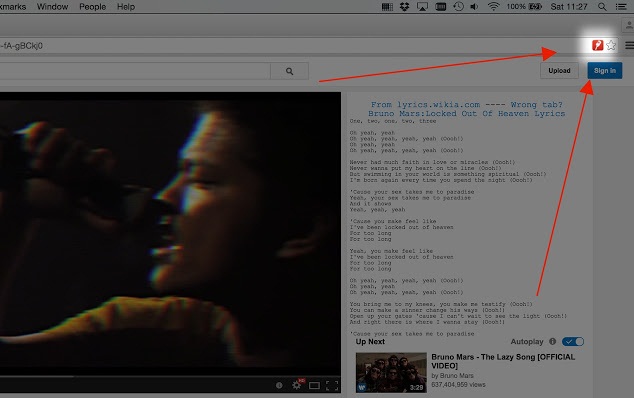
With simple operation, this extension can remove the vocals from a range of sound frequencies. This technique, which has been used in sound systems, may also be applied to YouTube videos. Simply install the Karaoke Mode, start a video and click on the service icon in the Chrome address bar.
However, the action does not work on all music videos from the site. With this in mind, the extension developer asks users to share videos on the extension works and add the playlist dedicated to karaoke.
Recent updates Karaoke Mode for YouTube brought great news. In addition to removing the vocals, the service displays the lyrics on the browser screen, just below the videos suggested by the site.
In tests, we detected small implementation problems that made the music play without the changes on vocals. However, the error is resolved after updating the browser screen.
Pros
Easy to use
Remove the track leading voice of music
Cons
Does not work on all YouTube videos
Learn How to put YouTube in Karaoke mode, and sing along with the music
Check out our tutorial and learn how to use the plugin and sing along with your favorite YouTube videos. The supplement also offers a playlist with some songs already sung by users.
Step 1. Access the page Karaoke Mode for YouTube and click the "Add to Chrome";
Step 2. Confirm the installation of the extension by clicking the "Add extension" option;
Step 3. Access a YouTube video and click on the Karaoke Mode for YouTube icon on the Google Chrome address bar. Wait until the vocals are removed, and the lyrics appear below the clip.
Ready. Remember that the extension does not work with all videos. To help, the developer has created a playlist with videos that accept the karaoke mode.




 Far Cry 3 Glitches: We Blame the Drugs
 Travelling Without Moving: Escapism and Wanderlust in Gaming
 How to Unlock Crossy Road Piggy Bank, Red Coins, Bonus and more
 Free eBook Today Only: 'Preserving Your Privacy in Windows 10'
 One Data-Saving Reason to Use Chrome on Android & iOS